Storiis Support
Analysis and Summaries
Updated
Storiis includes three kinds of AI-assisted review:
- Story Curves visualize scene-level tension, mood and pacing.
- Analysis examines the Plan through focused craft lenses.
- AI Summary turns the current Plan into continuous prose for reading.
These tools diagnose and describe. They do not rewrite the Plan. That separation is useful: you can understand a problem before inviting anything—human or otherwise—to solve it.
Story Curves
Show the Curves row in Plan → Scenes, then select Generate. Storiis scores each visible scene across three whole-story signals:
- Tension — dramatic pressure, conflict, danger or suspense, scored relative to the rest of the story
- Mood — emotional tone from grim to upbeat, independent of tension
- Pacing — how quickly the scene moves the story forward, considering both change and duration
Toggle individual curves to make the graph easier to read. Regenerate the scores after meaningful scene changes; Storiis marks older scores as stale.
After tension has been scored, Scenes → Tint Scene Columns → By Tension can use those scores to color scenes in the Scenes, Timeline and Cards views. The shared color ramp moves from blue for calmer scenes through cyan, green, yellow and orange to red for peak tension.
By default, the colors and the tension curve use the fixed 0–10 scale. Turn on Scale Tension to Story Range in the same menu to stretch this story’s lowest and highest scores across the full range. The fixed scale preserves absolute intensity and exposes a flat story; the story-relative scale emphasizes internal peaks and valleys but makes red mean “highest in this story,” not necessarily “10 out of 10.” If the scored scenes have no range, Storiis uses the fixed scale. See The Two Tension Scales for more detail.
When to Use Curves
Use Curves to locate patterns, not enforce a mathematically perfect shape. A long calm stretch may be a pacing problem, a necessary recovery or the setup for a spectacularly unpleasant dinner. The graph tells you where to look.
Filters affect the visible scene set, so clear them when you want the complete story shape.
Analysis and Story Health
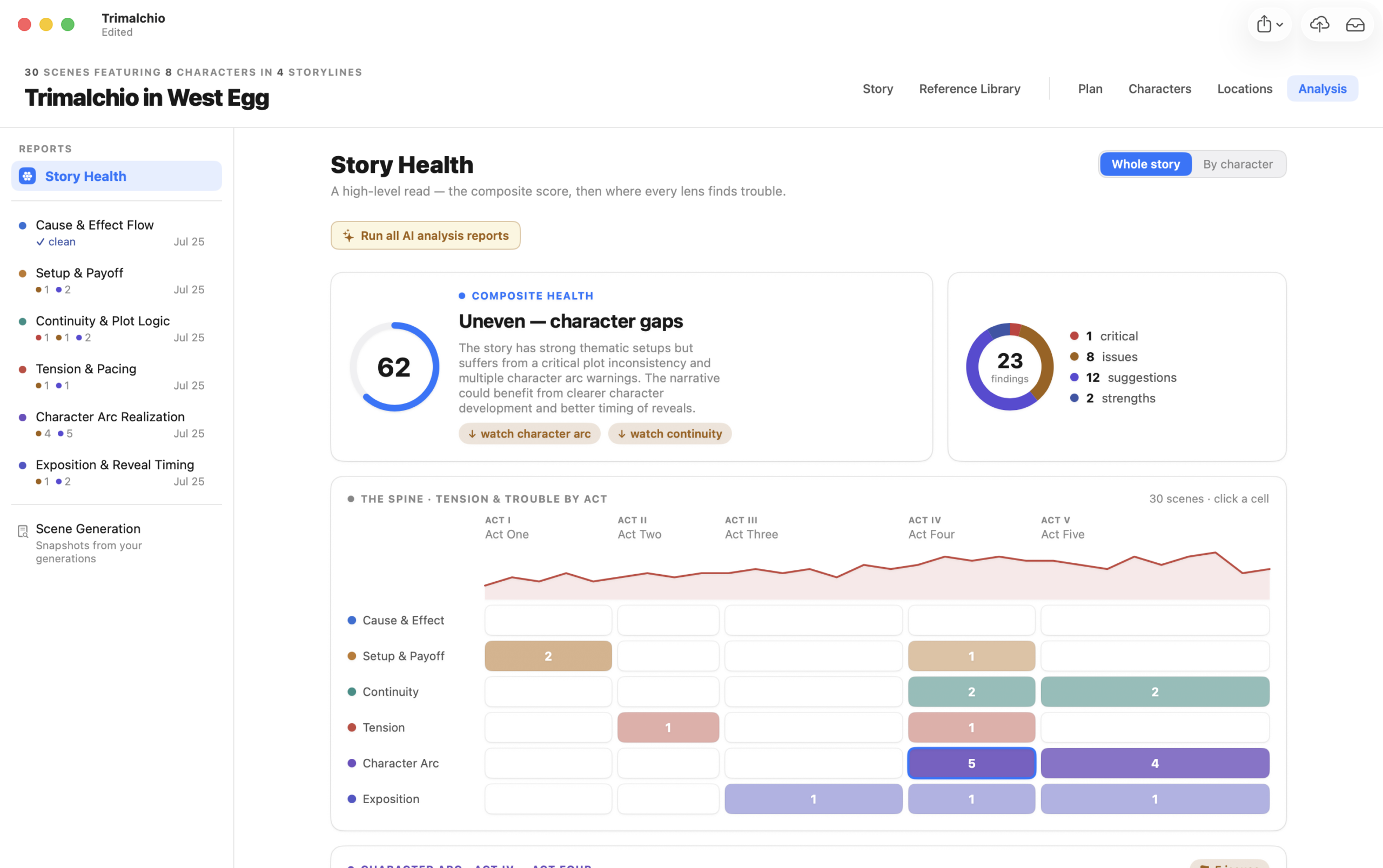
The Analysis section provides six AI-assisted craft reports.
Cause & Effect Flow
Checks whether important events and decisions create understandable consequences. Use it when the plot feels like a sequence of things happening rather than an accumulating chain of choices.
Setup & Payoff
Looks for promises that need resolution and payoffs that may lack preparation. Use it when reveals feel arbitrary or planted material appears to have vanished.
Continuity & Plot Logic
Examines timing, knowledge, locations, character presence and other Plan information for possible contradictions. It becomes more useful as scene timing and connections become more complete.
Tension & Pacing
Reviews the rise, release and distribution of dramatic pressure. Use it to investigate long stretches with similar intensity, crowded sequences or scenes whose function may not support their placement.
Character Arc Realization
Compares a selected character’s journey material with their actual scene appearances. Use it to find missing transitions, unsupported changes and journey beats that never become dramatic action.
Exposition & Reveal Timing
Reviews when important information reaches the audience. It can identify premature reveals, late explanations, overloaded scenes and necessary facts that have not been used.
Running Reports
Run one report when investigating a specific problem, or Run All Analyses at a major planning milestone. Story Health combines the available signals into an overview and supports character-focused review.
Reports create findings. You can inspect the affected material, ignore an intentional finding and rerun a report after relevant changes. Older results are marked as stale when the underlying Plan changes.
When to Run Analysis
Analysis needs enough entered material to support its conclusions.
- Character Arc needs character appearances and journey material.
- Exposition Timing becomes more useful when canonical information is connected to scenes.
- Continuity improves when locations, timing and character knowledge are recorded.
- Setup & Payoff benefits from clear scene descriptions, story beats and core events.
A report cannot evaluate the important rule you have heroically kept only in your head.
Interpreting Findings
Treat a finding as a question worth investigating, not a grade.
Ask:
- Is the flagged pattern intentional?
- Does the report have enough Plan information to understand it?
- Would a reader experience the issue, or is the apparent gap explained in material not yet connected to a scene?
- Does fixing it strengthen the dramatic question or merely make the structure more conventional?
Ignore a finding when it describes a deliberate choice or is not useful. Ignoring prevents it from demanding attention without changing the underlying story.
When a finding reveals a real structural problem, you can revise manually or discuss it in AI Plan Review.
AI Summary
Open Plan → Summary → AI Summary to generate a continuous prose account of the current Plan.
AI Summary is a reading aid, not a replacement for scene descriptions. Use it to notice what the planned story appears to emphasize, where causal steps become unclear and whether a subplot disappears when the details are compressed.
Storiis marks the summary when it is older than the current Plan. Update it after substantial revisions rather than after every corrected comma.
When to Use AI Summary
Generate a summary:
- Before sharing the Plan with a collaborator
- After a large structural change
- When comparing what the story emphasizes with what you intended
- When you have spent so long editing individual boxes that you can no longer remember what the story feels like as a whole
Read Scene Flow first when you want a direct presentation of your own Plan data. Use AI Summary when you want that information synthesized into more continuous prose.
Return to the AI Tools overview, or see Scenes and Plan Review when you are ready to revise what the reports uncovered.