Storiis Support
Analysis
Updated
Analysis looks across your Story, characters and Plan for structural patterns that are difficult to see one scene at a time. It is an AI-assisted review system, not a mysterious tribunal convened to revoke your writer card.
You choose which reports to run, review every finding and decide what deserves action.
Before You Run an Analysis
Analysis is most useful once the Plan contains enough scenes and connections to reveal patterns. It can still help early, but a report cannot evaluate story material that has not been entered.
Each run uses credits. Storiis shows an estimate before beginning. You can run all reports together or choose an individual lens.
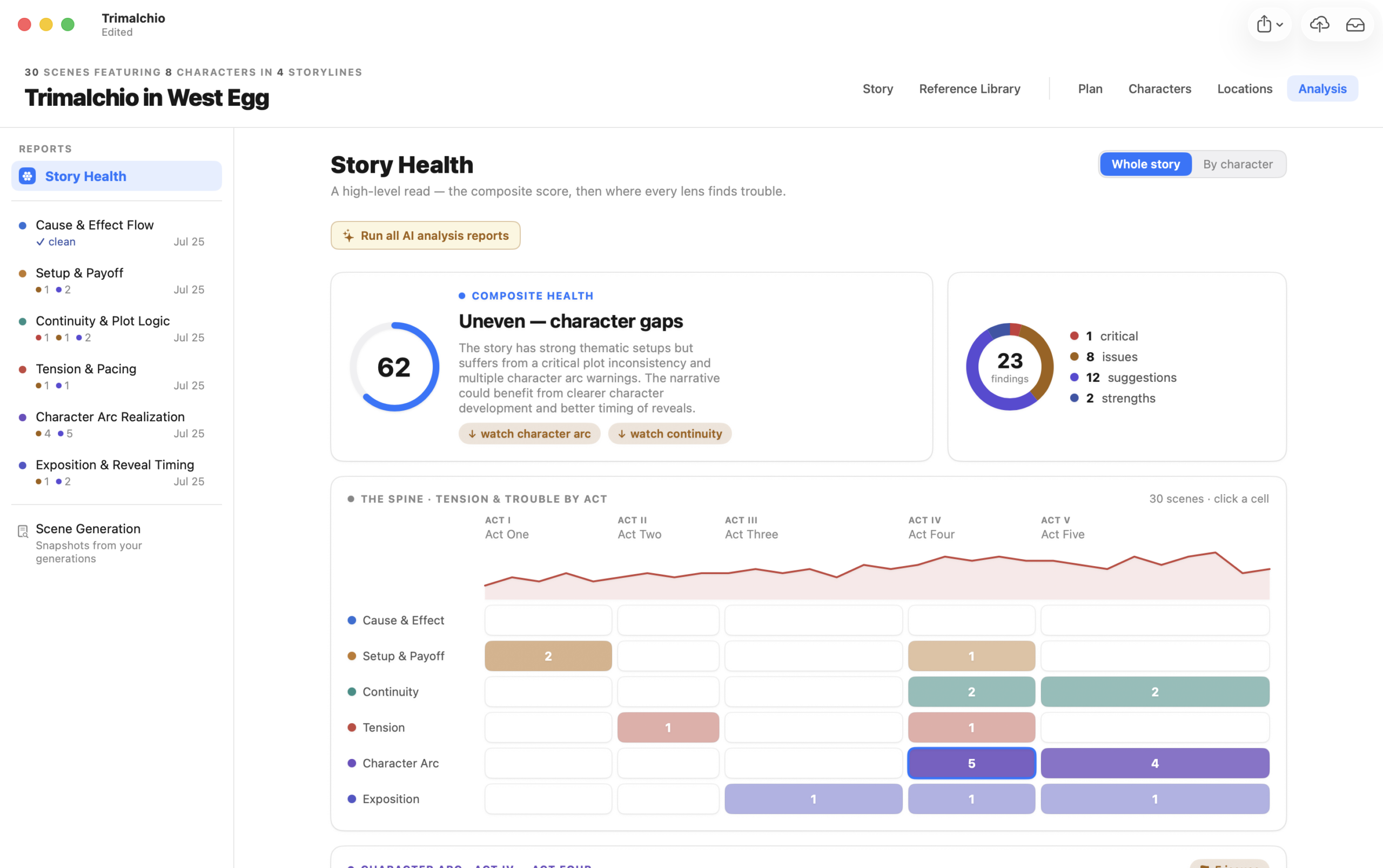
Story Health
Story Health gathers the major analysis signals into an overview. It can show the state of the whole story and break relevant findings down by character.
Use the overview to decide where to investigate, not as a score you must perfect. A deliberate exception may be exactly what gives a story its shape.
Cause & Effect Flow
Checks whether important events and decisions create understandable consequences. It can identify developments that appear unsupported, reactions without visible causes and chains that lose momentum.
Use this report when the plot feels like a sequence of events rather than an accumulating set of choices and consequences.
Setup & Payoff
Looks for promises, planted information and developments that appear to need later resolution. It can also identify payoffs that arrive without enough preparation.
Not every image or line of dialogue needs to become a plot coupon. Review the finding in the context of what the story is actually promising.
Continuity & Plot Logic
Examines timing, knowledge, locations, character presence and other Plan information for possible contradictions or logic gaps.
This report becomes more useful as scene timing and connections become more complete. A continuity checker cannot infer the travel rule you have heroically kept only in your head.
Tension & Pacing
Reviews the rise, release and distribution of dramatic pressure. It can flag long stretches with similar intensity, crowded sequences and scenes whose function may not support their length or placement.
Pacing is not a demand for constant escalation. Quiet scenes can be necessary; the question is whether they create contrast, consequence or anticipation.
Character Arc Realization
Compares character journey material with what is actually represented in planned scenes. It looks for missing transitions, unsupported changes and arc beats that never become dramatic action.
Use the character-specific Story Health view alongside this report when revising a central arc.
Exposition & Reveal Timing
Reviews when canonical facts and important information reach the audience. It can identify late explanations, premature reveals, overloaded scenes and facts that appear necessary but unused.
This analysis is strongest when exposition has been connected from the Reference Library to specific scenes.
Findings
Open a report to review its findings and the Plan material behind them. A finding may include affected scenes, characters or storylines and a suggested direction for revision.
You can ignore a finding that is intentional or not useful. Ignoring keeps it from demanding attention without deleting the underlying story material.
When the Plan changes, Storiis can mark earlier analysis as stale. Rerun the relevant lens when you need an up-to-date review; you do not need to rerun everything after every small edit.
Run All or Work One Lens at a Time?
Run All Analyses is useful at milestones: after the first full Plan, after a major structural revision or before exporting for outside review.
An individual report is usually better while solving a focused problem. If you are repairing a character arc, another complete pacing report may simply give you a second list to avoid.
Moving from Findings to Revisions
Open the affected items and revise them in the Plan, or use AI Plan Review to discuss analysis findings alongside the current structure. Plan Review can prepare changes, but you choose whether to apply them.
After revising, read Summary and rerun only the analyses that the change materially affected.
Hiding AI Features
All Analysis tools rely on Storiis AI. If Hide AI Features is enabled in System Settings, the Analysis section and other AI controls are hidden. Your non-AI story and Plan tools remain available.