Storiis Support
Cards
Updated
Cards presents the Plan as a visual board of scene cards. It contains the same scenes as the Scenes view, but gives each one enough room to surface its most important information at a glance.
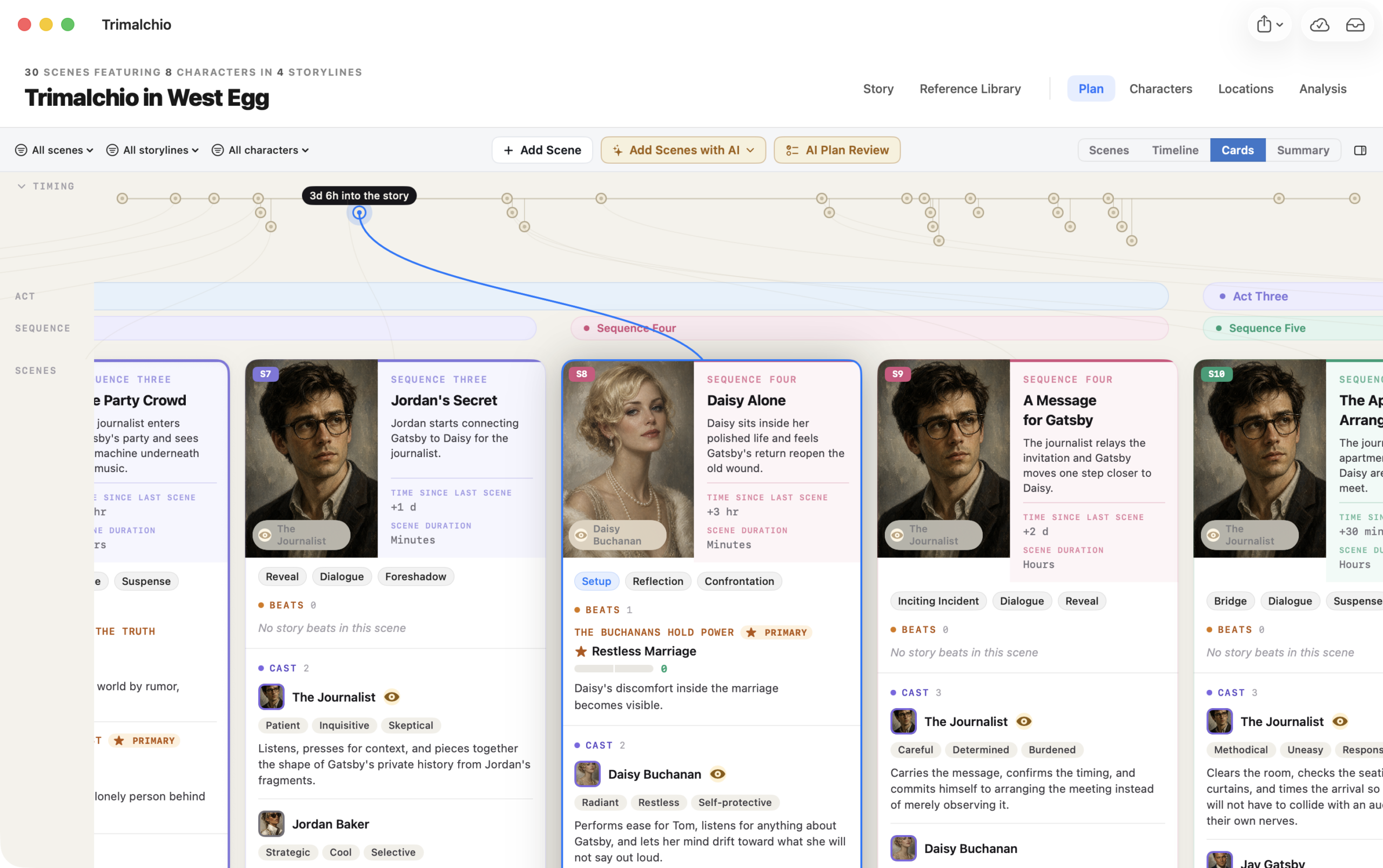
Reading a Scene Card
A card can show the scene’s title and description together with useful Plan connections such as:
- Point-of-view character and cast
- Story beats and storylines
- Timing and duration
- Structural placement
The compact timing strip above the cards helps you compare narrative position with story-world chronology.
Grouping the Board
Cards are grouped by act and by your selected secondary structure: sequences or chapters. Change that language through Scenes → Group Scenes by.
Structural grouping makes Cards particularly useful for reviewing balance. A sparse middle act or an overloaded chapter is difficult to ignore when it occupies literal space.
Working with Cards
Select a card to work with its scene and connected information. Use the Plan filters to narrow the board by scene, storyline or character.
Changes made to a scene in Cards are changes to the same scene shown in Scenes, Timeline and Summary. The views are different lenses, not separate copies of the Plan.
Use Scenes → Tint Scene Columns to color cards by their scene, storyline, sequence, act or AI-scored tension. The setting is shared with Scenes and Timeline, which makes it possible to follow the same visual pattern while changing views. See Coloring Scene Columns, especially the difference between the fixed and story-relative tension scales.
When to Use Cards
Cards is helpful when you want to:
- Read the broad dramatic progression without the full row structure
- Compare scene density across acts or chapters
- Trace point of view and cast distribution
- Spot repeated scene purposes or descriptions
- Review timing without leaving narrative order
For detailed construction, switch to Scenes. For the story’s actual chronology, use Timeline. For a continuous reading view, use Summary.