Storiis Support
Reference Library
Updated
The Reference Library is where you keep the material that makes your story possible without necessarily appearing on the page all at once.
World rules, historical events, research links, visual ideas, stray notes and index cards can all live here. Some of them may become essential story facts. Others may simply help you think. Both are legitimate uses; not every excellent idea needs to be marched into a scene at spearpoint.
The Library rail can be shown as a compact list or as thumbnails. Every content type remains visible even when empty, and the New menu lets you create any supported item.
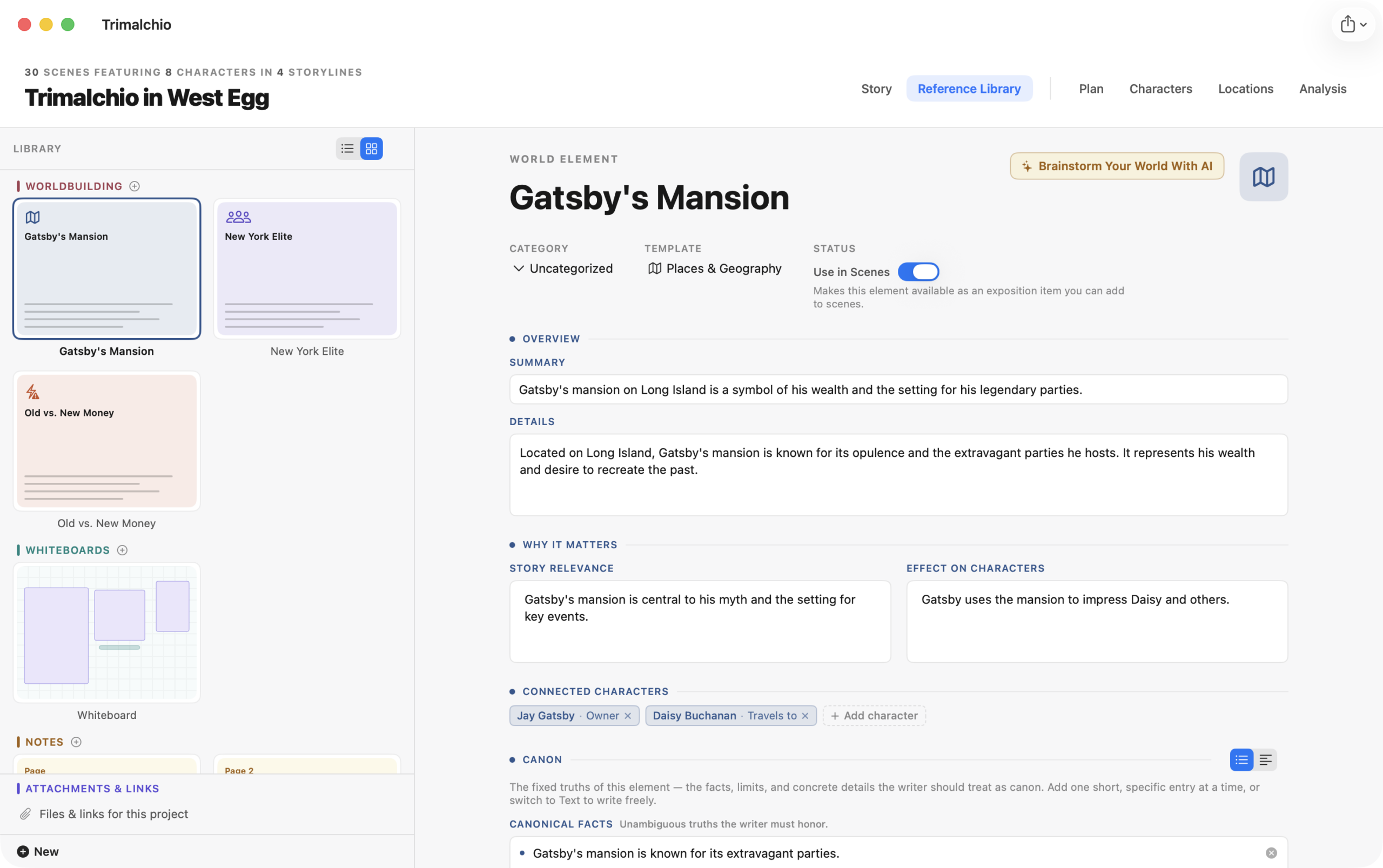
Worldbuilding
A world element represents a meaningful part of the setting: a culture, organization, technology, belief, law, object, species, custom or any other concept that deserves its own record.
World elements can include:
- A description and domain
- Canonical facts—the fixed truths a writer or AI should not contradict
- Constraints—the limits and rules that govern the element
- Relationships to characters and other world elements
Turn on Use in Scenes to make a world element available as exposition in the Plan. If you later turn it off while scenes use it, Storiis warns you before removing those scene connections.
Brainstorm Your World with AI
Select Brainstorm Your World With AI from a world element to begin a guided interview. The assistant asks focused questions, lets you answer or skip, and produces a draft for review.
You choose which fields to apply. Existing writing is preserved unless you explicitly select a proposed replacement. New character ideas are off by default; enabling one creates and links that character.
Whiteboards
Whiteboards are open visual spaces for arranging text and images. Use them for mood boards, relationship maps, thematic clusters, visual research or the sort of idea that steadfastly refuses to become a tidy list.
You can:
- Add and format text
- Upload an image from your Mac
- Add an image from a URL
- Generate an image with AI
- Move, resize and layer items
Whiteboards are reference spaces rather than scene-ordering tools. Use Plan → Cards when the things you are arranging are the actual scenes of the story.
Notes
Notes are free-form pages for research, fragments, questions, discarded possibilities and longer reference material.
They are intentionally flexible. A note can be a polished piece of canon or a sentence that reads “What if the aunt is the lighthouse?” Storiis will not judge, although future-you may have follow-up questions.
Timelines
Reference timelines hold story-world events that are not necessarily scenes. Create an event, describe it, assign a category and place it:
- At the start of the timeline
- Immediately before or after another event
- A set amount of time before or after another event
Events can also have a duration.
Turn on Use in Scenes to make an event available as exposition. This is useful when a past war, discovery, disappearance or betrayal needs to be deliberately referenced by scenes in the Plan.
Reference timelines are separate from Plan → Timeline. A Reference Library timeline organizes historical or contextual events. The Plan Timeline lays out your scenes according to their timing.
Index Cards
An index-card set is a flexible board of reference cards. Each card can have a title, notes, image and category.
You can search and filter a set, zoom the board, select several cards at once and apply a category in bulk. Double-click a card to open its full detail view.
Turn on Use in Scenes for a card when it represents information that should become available as exposition.
Index cards in the Reference Library are general-purpose reference material. The Cards view in the Plan displays scenes; despite both being rectangular and stubbornly card-like, they are different tools.
Attachments & Links
Attachments & Links is the project’s file and link library. Add supporting documents from your Mac or save web links alongside the story.
You can organize items into categories, preview supported files, open the original item and edit its information. Removing an attachment from the Library removes it from the Storiis project; it does not delete the original file from your Mac.
Connecting Reference Material to Scenes
World elements, reference-timeline events and index cards can become exposition items through Use in Scenes.
Once enabled:
- Open a scene in the Scene Wizard or inspector.
- Find Exposition this scene conveys.
- Add the relevant item.
- Use the Plan and Analysis views to check when information is introduced or revealed.
This connection is the difference between knowing a fact about your world and deciding that the audience learns it now.
Renaming and Deleting Items
Rename or delete Library items from their contextual menu. When an item is used by scenes, Storiis warns you before deletion or before removing its Use in Scenes status.
Deleting a Library item is permanent, so read the warning carefully—particularly if the item is named something deceptively harmless like “Temporary Notes.”
Explore this feature